Codex Reset

Never babysit the usage-limit wall again.

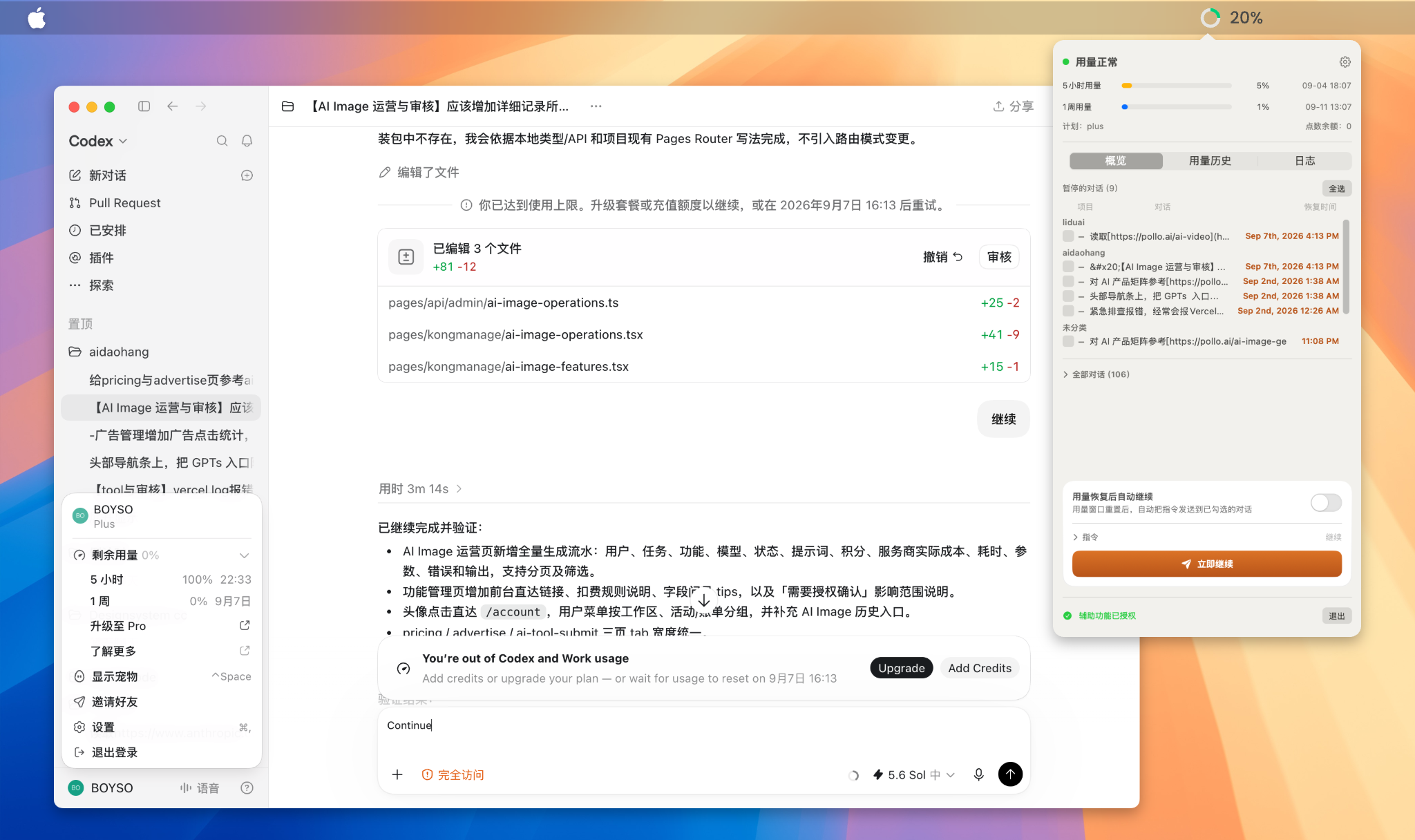
A free, open-source macOS menu-bar companion for the Codex desktop app. It watches your usage windows, detects conversations paused by the usage limit, and resumes them automatically — the moment your quota is back.

What it does

Live usage at a glanceA usage ring with a percentage right in the menu bar, plus 5-hour and 1-week bars, next-reset countdown and credit balance.
Finds paused conversationsDetects every thread stopped by the usage limit and shows its recovery time.
Auto-resume on resetWhen the 5-hour window resets, sends your command (default “Continue”) to every conversation you’ve checked.
Browse & pick any threadAll projects and their conversations are listed — resume any of them, not just paused ones.
Double-click to jumpOpen any conversation directly in the Codex app.
Usage history timelineEvery window reset is recorded automatically, so you learn exactly when quota comes back each day.
Download

⬇️
Get Codex Reset for macOS

Free and open source (MIT). Everything runs locally on your Mac — no account, no telemetry, your chats never leave your machine.

macOS 14+Apple Silicon / Intel~3.4 MBMIT License

First launch (Gatekeeper)
The app is signed with an Apple Development certificate but not notarized yet. If macOS says the developer cannot be verified: right-click Codex Reset.app and choose Open, or go to System Settings → Privacy & Security and click Open Anyway.

SHA-256 checksum: a19fb48fe8f66eec6460622981ff5c75d484b582e1fe430e237b563f1172e1b9

How to use

Requirements

Install as a menu-bar app

git clone https://github.com/boyso/codex-reset.git
cd codex-reset
./make_app.sh              # builds & installs /Applications/Codex Reset.app
./install_launchagent.sh   # optional: auto-start at login

Open the app from the menu bar. It keeps running quietly and resumes your checked conversations as soon as usage recovers.

Or use the CLI

./Codex Reset --query                    # print usage + paused threads
./Codex Reset --continue <thread_id>     # resume one thread right now

Panel essentials

How it works

Codex Reset talks to your own, local Codex install on two channels, most reliable first:

  1. Local app-serverConnects to Codex’s bundled local server and starts a new turn with your command. Fast, scriptable, no permissions needed.
  2. GUI fallbackIf the desktop app is holding the conversation open, it deep-links into Codex, focuses the input box, pastes your command and sends it with ⌘Enter. This path needs Accessibility permission.

Privacy: everything happens locally. Codex Reset reads ~/.codex data read-only and never sends anything off your machine. No account, no telemetry.

FAQ

Is this an official OpenAI product?

No. Codex Reset is an independent, open-source utility. It is not affiliated with or endorsed by OpenAI.

Does auto-resume consume my usage?

Only in the same way resuming manually does. It resumes work that was already in progress — it never exceeds what your plan allows, and it only runs after the limit has reset.

Is it safe? Does it touch my data?

It only reads your local ~/.codex state/history databases (read-only) and talks to Codex’s local server. Nothing leaves your Mac.

Why does it ask for Accessibility permission?

Only the GUI fallback channel uses it — to type into the Codex window when the app holds the conversation open. Enable remote_control in Settings (and restart Codex) to use the protocol channel instead.

Will it keep working after Codex updates?

Codex Reset was reverse-engineered from local behavior, so an update can occasionally change something. If it stops working, open an issue with the error and your Codex version — fixes are usually quick.

Which conversations are resumed?

You decide. Nothing is pre-selected — check the paused conversations you care about, or any others from the full list. Per-section “select all” exists if you want the whole batch.

I’m stuck / found a bug.

Open an issue on GitHub with the panel log, your macOS version and your Codex version. Pull requests are welcome too.